Uncovering Google's PageRank System
by Jerry West
Updated July 3, 2003
By now everyone on the web has heard of Google
<http://www.google.com/>, touted as the cleanest and best search engine
on the web. How they got there was pure genius ... they got there with simplicity.
They ignored meta tags, hidden text, spamming techniques, etc. The bottom line was you
couldn't trick Google with techniques that worked on other search engines like AltaVista
and HotBot. What was visible on your page was what Google indexed. Their results were
pure. There was not a chance of typing in "investment advice" and getting a porn
site.
People loved that.
Google literally pillaged the search engine community of market share. Left in its wake
were Infoseek, Excite, Lycos, HotBot and AltaVista. Search engines which once dominated
the industry now combine for a fraction of the market.
How great is Google's dominance right now? Since they have taken over the primary
search results from Yahoo! on October 9th, and including market share from AOL Search,
Netscape, Go and iWon, Google now commands approximately 68% of the market.
So, how exactly can you get traffic from Google? In a word, it's simple: hard work.
Okay, not so simple, but achievable. While increasing your PageRank is just one of the
100+ forms of criteria Google uses to rank sites in their search results, our testing has
concluded that without it, you cannot compete for the popular keywords. The same keywords
that will actually bring your site the traffic you need to turn a profit. This is often
referred to as the keywords "above the threshold."
The keywords "below the threshold" are ones that are very specific and do not
carry the weight of hundreds or thousands of queries per day. Keywords "below the
threshold" are those you can achieve top ranking with optimization techniques. But
what you are after is getting top listing for the heavy weights. The keywords that dazzle
your client, your boss, or your prospect. What follows is a step-by-step breakdown on how
to achieve a higher PageRank.
First of all, you need a few tools at your disposal:
Alexa Toolbar <http://download.alexa.com/> -
This toolbar is a MUST for any owner of a website. It informs you of web traffic ranking
for every site you visit, the contact information for each site, and provides reviews on
each site. Yes, they track where you go on the web, but you need this ... more on this
later.
Google Toolbar <http://toolbar.google.com/>
You will wonder how you lived without this toolbar. You can search Google at anytime and
the added tools will boost your effectiveness online. Google tracks you much of the same
way that Alexa does. The Google Toolbar will inform you of the PageRank of every site on
the web. This is information you can't live without.
We will break down both toolbars throughout this article.
What is Google's PageRank anyway?
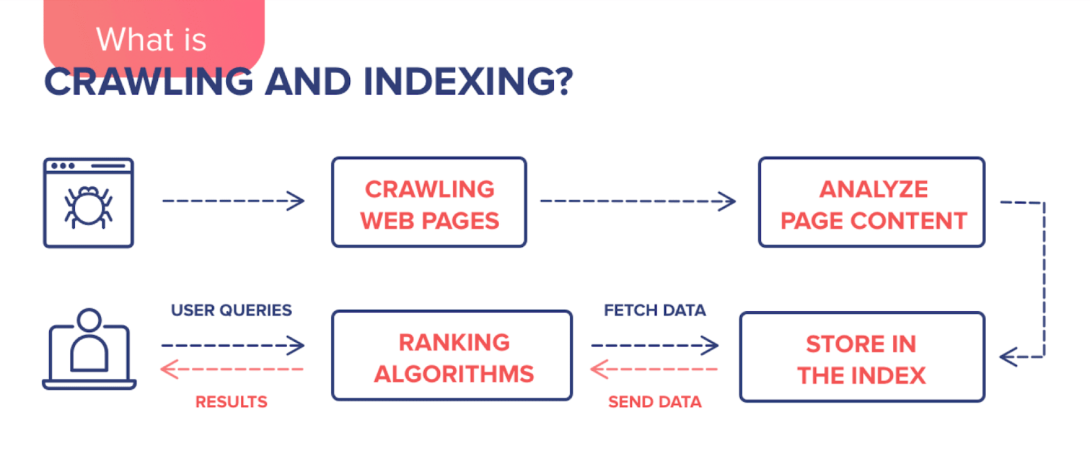
PageRank is Google's method of ranking individual web pages. Google looks at the pages
which link to your page and how they rank in terms of importance. In a nutshell, pages
that have links from important, high quality pages, receive a higher PageRank. Google
combines PageRank with sophisticated text-matching techniques to find pages which are both
important and relevant to your search. For more information, see Google's explanation of PageRank <http://www.google.com/technology/index.html>.
The PageRank system is a numerical grade from 0-10. There have been great articles
written in the past on how to estimate and compute PageRank, and they can be confusing to
some. So, in a simplistic breakdown, think of PageRank in terms of point value. The
following numbers are not valid, they are just used to visualize the process:
| PageRank |
Value |
| 4 |
100 |
| 5 |
1,000 |
| 6 |
10,000 |
From this example, the values increase by ten fold for each level of PageRank. This is
very similar to how it actually is. It is approximately ten times more difficult to climb
to the next "rung" in the PageRank ladder.
You may have noticed a few months ago that Google increased the levels for PageRank of
5 and above. Many sites have seen an increase in the number of links to their site, while
their PageRank has dropped a point. This caused a lot of panic to site owners, wondering
if they had been penalized. Not so. Google simply "raised the bar".
The biggest mistake most webmasters make when requesting links is they look at the
PageRank of the home page. "They have a PageRank of 5, not bad, I'll request a
link." But the link isn't going on the home page. Instead it goes on a "links
page" that has a PageRank of 3. According to the testing we have done, pages with a
PageRank of less than 4 are not counted in the PageRank formula. This link is worthless.
When determining value of a link, you must go to the page where your link will be
present. If that page has a PageRank of 4, write down "100". This is the
"value" of the page. The value of that page is then shared with every link on
the page including any graphics that serve as links (i.e. banners). Count up the number of
links on the page. If there are 20 links, you divide 100 by 20 to get a value of 5 per
link. If it takes 1,000 points to reach a PageRank of 5, you would need 2,000 of these
types of links to achieve that level.
However, had that page been a PageRank of 6, with the number of links being equal at
20, each link would be worth 500 points. It would take just two of these links to achieve
a PageRank of 5. See the difference? It is called quality. This is why link farms, web
rings, etc. are worthless. The PageRank value becomes dilluted. Also, particpating in
these types of programs does not benefit the web community, they are done for no other
means than artifically inflating your PageRank.
The engineers at Google are smart; they have in the past, and will in the future,
penalize for poor ethics.
What is the best way to increase your PageRank? Making sure the majority of the links
pointing to your site match the "theme" of your site. Otherwise known as
"theme sites".
What is a theme site?
A theme site is one that has links to other sites of parallel industry. For example, I
am going camping this weekend. I did a search in Yahoo! on "camping gear." One
of the results was Camping Gear Equipment
<http://www.campinggearequipment.com/>. I will use them as an example in
this article.
To become a "theme site" they will want links not from other camping gear
sites, since those are competitors. Instead, they will seek links from camping
destinations, fly fishing destinations, dehydrated food suppliers, etc. If I am in the
market for weekend fly fishing trip, it is very probable that I would also be interested
in upgrading equipment.
Make sense?
Pulling traffic to your site through Google does take work, but the rewards will be
well worth the effort. We will list the steps briefly and then we will expand the
discussion using a real-life example.
1. Review your site content and design completely.
2. Verify that all of your links work.
3. Build a site map.
4. Submit your site to the Yahoo! directory.
5. Submit your site with the Open Directory Project
<http://www.dmoz.org>.
6. Create a "resource" page on your site.
7. Begin your research.
8. "Theme based" site research.
9. "Competition based" site research.
10. Affiliate based site research.
11. Compare your lists.
12. Other sources for links.
13. Send emails.
14. Follow up, follow up, and follow up.
Detailed breakdown.
Example site referenced: CampingGearEquipment.com
- Review your site completely. Corporations should have their sales teams
review the entire site top to bottom and make suggestions. After all, they are the driving
force behind your market share. What helps them sell in the field will help you sell more
on the web. If you are a sole owner of your site, read all of your content out loud. Have
two or more associates review your content. What sounds fine to you may not make sense to
another. Test your site on a modem connection. Is it fast? Are there long waits for pages
to download? Now is the time to streamline your site. In reviewing our example site, the
site could use some improvement. It takes over 35 seconds to load on a standard 56k modem
connection, which is very poor. It's no wonder, they have a graphic that is 72k in size.
The standard is 20 seconds or less. By optimizing their graphics, they could get to a load
time of 18 seconds. You can use OptiView
<http://www.optiview.com> to test your site for free. There are pages
which are "under construction" and the navigation on the left is difficult to
read on some screen resolutions.
- Verify all of your links. Don't just verify links internally but the
external links as well. There are link checkers built in to programs like DreamWeaver.
There are also link checkers available on the web. A great tool that is not well known is Xenu <http://home.snafu.de/tilman/xenulink.html>. Mark
Herre of 10x Marketing <http://www.10xmarketing.com>
gave me that tip. All links are valid when performing an audit on our example site.
- Build a site map. The site map should list every page on your site that
you want indexed. Make sure you have a text link at the bottom of your Home Page to your
site map. Google will spider your home page, hit this site map and index every page
listed. By doing a site map, you are ensuring your entire site will be indexed. Plus,
Google loves site maps ... it makes GoogleBot's job so much easier and faster.
There is not a Site Map for our example site. All the webmaster needs is Xenu and the job
is done - fast!
- Submit your site to Yahoo! ($299.00 annual fee). In seven (7) business
days your site will be reviewed and either accepted or rejected by the Yahoo! editor. See
our tip sheet
<http://www.webmarketingnow.com/tips/yahoo.html> for getting a successful
listing. Going to Yahoo! and typing in "campinggearequipment.com" and searching
produces the site at the #1 position. You will notice a red arrow pointing to "More
sites about: Camping > Gear and Equipment". This is referring to the site's Yahoo!
directory listing in the Gear and Equipment section.
Since Yahoo! is not pulling their primary search results from their directory, why should
you submit your site and pay $300.00? There have been numerous articles against submitting
your site to Yahoo! until they change their criteria back. I disagree. Why? Yahoo! is not
just the #1 portal on the Internet, they are the #1 site in terms of traffic. Why would
you not want your site listed in the best portal in cyber-space? Also, being listed in
Yahoo! brings an often "un-published benefit" that will be discussed later.
- Get listed with the Open Directory Project
<http://www.dmoz.org> (DMOZ). Since AOL switched from DMOZ to Google
for their search results last year, DMOZ is no longer vital as a source for solid traffic.
Instead, look at them to boost your quality link popularity. DMOZ is humanly built, just
like Yahoo!. But unlike Yahoo!, DMOZ is free a submit. You are allowed to be listed in up
to two categories for your site: a general category and a local category.
Google has openly stated that they are more interested in directories that are actually
used, and with the rapid drop of DMOZ traffic in late March, Google may be turning away
from DMOZ in the near future. However, since they are still pulling from DMOZ, and DMOZ is
still a top 200 site, it is important to get your site listed.
One major complaint is the "staleness" of DMOZ as the directory is not updated
frequently. However, the directory just had an update on April 24, 2003. If you have a
submission pending inclusion, check to see if your site is listed.
- Create a "links" or "resources" page on your site. The
term "links" has been overused in my opinion and I am suggesting using the term
"resources" instead. It is on this page you will list your link exchanges with
other webmasters.
- Begin your research. My suggestion is to use a spreadsheet. You will need
three: one for your theme page research, one for your competition research and one for
your affiliate research. If you use Excel, you can create three separate tabs. You want
columns to cover the following: Company Name, URL, Alexa Ranking, PageRank, Yahoo!
inclusion, DMOZ inclusion, Google links, Quality of the site (eye appeal), Link Request
Date, Link Approval Date, Last Verified and Comments.
- Theme based site research. Perform searches in Google for search terms
that show results of sites which relate to your theme, but who are not direct competitors.
You want to establish a list of at least 50 web sites that would be viable for you to
request a link from. Remember, these sites are NOT competitors. Use your Google
Toolbar to ensure they have a good PageRank (5/10 or above) and use the Alexa Toolbar to
ensure they receive decent traffic. We would recommend you bypass any site that is ranked
500,000+ in Alexa.
In our example site, let's go to Google and type in "camping food ". The #4
listing is Mountain House. Clicking on the listing takes us to the site. The Alexa Toolbar
tells us that the site is ranked #428,443 and the site has been online for over four years
(Site Info). Hovering your mouse pointer over the PageRank on the Google Toolbar informs
us that the PageRank is 6/10. This is a site that we will put into our spreadsheet. They
would not only be a perfect link opportunity, but this is a great resource for potiential
customers. So we will put them in both the Theme and Affiliate spreadsheets. You will
continue in this fashion until you have at least 50 theme sites.
But wait, do not leave the site so fast. On your Alexa Toolbar, click "Related
Links". The two sections you want to review are: "People who visit this page
also visit" and "Other sites that link to ...". These two sections will
give you sites which are similar and who link to their site. This will speed up your
research. Next is determining their listing in Yahoo!, DMOZ, and checking the number of
links in Google.
- Competition based site research. Again you will use Google as your search
engine. This time you will input searches using your direct keywords. Note: If you already
know your competition, start with visiting their sites and then expand your list with
searches in Google and using the Alexa toolbar. Competition research is a little different
as you are focusing on who can realistically compete with you. If you are a small business
that sells general merchandise, Sears is NOT your competitor! Just the same
way that McDonalds' competition is not the Ma-and-Pa burger stand. It is Burger King,
Wendy's, etc. Just because this is the Internet does not mean you can compete with the
"Big Boys." Be realistic in your views.
Continuing our example, type "camping equipment" in Google. Check out the sites
one by one, beginning with the ones listed first in the search results below the Sponsored
Links. Look at the URLs in the description of the search result. If your market is
specific to your country, do not click on any results that are from other countries. Also,
avoid web sites which are not worth your time (i.e. geocities, yahoo stores, aol, etc.) as
they can be gone tomorrow. Plus, sites which are a secondary domain (i.e.
www.aol.com/bobsgifts/) have the traffic and link information for the parent domain, not
the sub domain. In this case it would report aol.com, not bobsgifts.
Going back to our example, the first listing is REI's site. REI is far above our example
site in terms of quality, price, and availability. An example of a competitor would be
result #3, A Happy Camper. This site ranks #559,962 in Alexa, but also has a 6/10
PageRank. Far better than the 4/10 PageRank of our example site. On the Google Toolbar
click on "Page Info" and then choose "Backward Links". This will show
you exactly who is linking to this site - just 240 sites. This means, that with a PageRank
of 6/10 and a low number of links, the links are high quality. We just found a
"diamond in the rough". This is a great addition to your spreadsheet, and by
reviewing each of these sites, and contacting each site for a link exchange will allow the
owner of Camping Gear Equipment to increase their Internet exposure and their PageRank in
the process.
- Affiliate based site research. This is done while you are doing your
competition research. When you find affiliates of your competition, you want to contact
them so they become YOUR affiliate. It's that simple. By taking away an affilate from your
competition, you double the damage to your competitor, as you are increasing your
affiliate base by one and taking one away an affiliate from your competition. You want at
least 50 quality affiliates to contact.
- Compare your lists. Make sure you don't have duplicate sites. For example,
it wouldn't be very professional if you contacted the same company twice, once for a link,
and once to become an affiliate. To be successful, it is vital for you to be both
consistent and professional.
- Other sources. If you have suppliers, Michael Campbell suggests getting
your "upstream" and "downstream" suppliers to link to you. And of
course, you should link to them. This will form a strong "theme" base for your
business. If you are a wholesaler, list your top ten retailers as a reward to them.
Advertising agencies and print shops can link to their customers and vice versa.
Robin Nobles suggests that you go for authoritative sites. Look for vertical engines and
directories in your topic areas. Look for popular sites. One or two authoritative sites as
a link will be more beneficial than 1,000 irrelevant links. Turn to searchengineguide.com
<http://www.searchengineguide.com/> or beaucoup.com
<http://www.beaucoup.com/> for a listing of vertical engines and
directories.
Unpublished Yahoo! Tip: Do not discount the number of webmasters contacting your for link
requests. This is where a listing in Yahoo! is beneficial. Webmasters seem to use Yahoo!
more than any other portal as a means for finding sites to link to. Get a listing in
Yahoo! makes increasing your PageRank easier.
- Send emails. Contact the Webmaster of each site and custom craft your
message and make your request (link exchange or affiliate offer). If appropriate, it may
be more productive to pick up the phone and start dialing. Never send out mass email no
matter how much time you might think it will save you. It is poor ethics. You have
probably received a few dozen already ... "Hi, I found your site while surfing my
favorite search engine Yahoo! and wanted to ask to exchange links with us." Your
initial thought is, "You've never been to my site!" You don't want the same
reaction to your email, so custom write each request.
- Follow up, follow up, and follow up. Keep good records. Make sure the link
requests follow through. Many webmasters will agree to exchange links but they never post
your link. We suggest doing the above at least every 30 days. This will ensure that your
site has quality links, they are up to date and they match your theme. With quality link
partners, solid affiliates and good customer service, your site should have its most
profitable year in 2003!
© 2003, WebMarketingNow.com
Jerry West is the Director of Internet Marketing for WebMarketingNow. He has been
consulting on the web since 1996 and has assisted hundreds of companies gain an upper-hand
over their competition. Visit <http://www.webmarketingnow.com/>
for the latest in marketing tips that are tested and proven.
|